Multi-Session Series- Adobe Lightroom Classic- File Management & Editing- Hunt’s Photo, Melrose
December 7, 2023 @ 6:00 pm - 8:00 pm
December 14, 2023 at 6:00pm
December 21, 2023 at 6:00pm
Class Summary
December 7, 2023 @ 6:00 pm - 8:00 pm
- Make sure to bring your laptop with a power cable
- It is essential to have Adobe Lightroom Classic installed on your computer. If this is your first time using it, make sure you can open the program.
- We encourage you to make sure your software is up-to-date with the newest version
- If your computer requires an adapter for USB, make sure to bring it
- As always, bring your enthusiasm and creative thoughts!
As always, if you are sick or feeling unwell, STAY HOME! You must contact classes@huntsphoto.com prior to the event for a credit towards a future walk. Please see Cancellation Policy for details.
Refund Policy – Classes / Walks / Workshops
For classes, walks, & workshops, cancellations and postponement can be made up to 72-hours prior to the scheduled time. Refunds cannot be granted for cancellations placed less than 72-hours/3-days before a class or walk, but you can receive a 75% credit toward a future class, walk, or workshop.
Longer form (multi-day or full-day) or guest speaker workshops may have other policies noted. Please check the workshop description or the “Misc” section of the page.
For all cancellations, you must contact classes@huntsphoto.com prior to the event. If you register for a class and do not show up, your payment will be forfeited..
This is a great opportunity to build up your editing skills in Lightroom!
Adobe Lightroom is the choice program for professionals and amateurs, with ever-growing capabilities and options. However, there are many levels to understanding in the program. How do we organize our photos? What do we do to make basic changes? Once we learn those changes, how can we “step it up” and figure out what to we’re supposed to do? How do we make images pop? And finally, how do we put it all together and making finishing touches to our images.
Join Hunt’s Photo Education for a course that helps answer many of these questions. Often, Lightroom users struggle with the inability to determine what changes are “good” or “correct”. While those terms are subjective, we will help you along in the editing process to see how to make determinations along the way.
This is a Multi-Session Class! In Week 1, we will begin by discussing how to organize your images for quick retrieval via keywords, ratings, and more, as well as giving a description on how to consider organizing your photos on your computer. Specifically, we will cover brief computer file management, the importance of keywords, flagging and rating photos, and searching metadata to find images. In Week 2, we’ll start with the basic adjustments using Basic Development controls. More than anything, we will be emphasizing global changes and understanding what can be done with an image in Lightroom. We’ll then dive into Color, Curves, Contrast & Clarity & Texture. These changes will help make your images pop. In Week 3, we’ll discuss advanced editing, including local adjustments, such as radial and graduated filters, and how to “finish” the image- sharpening, noise reduction, and more.
In-between each session, we will give assignments to help you become more proficient and grasp the material! This class is strongly recommended for anyone looking to further their skills with Lightroom!
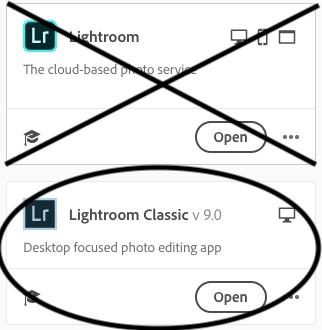 An important note about this course! There are now a few different versions of Adobe Lightroom right now. This course is specifically on Adobe Lightroom Classic. The other version of Lightroom, commonly known as “Adobe Lightroom CC” (yes, we understand you may be confused by this) is a more mobile and cloud-based program. The look and feel of the program is completely different– This course is specifically on Adobe Lightroom Classic. (See graphic on the right.) If you are unsure, feel free to email us at classes@huntsphoto.com. Important: If you are taking this course, make sure to download/update the program in advance, as you will not be able to download the program at the store. Older versions, such as Lightroom 5 or 6, are also acceptable, though not all functions will be available.